
Monday, 8:55am. You type one line into Claude:
Where are we, and what needs me today?
A few seconds later you have it. Two initiatives at risk and the reason for each. Three tasks of yours due this week. Ana is off Thursday, which is why the design review has no room in it. You reply, in the same window: move the review to Wednesday, add a blocker to the billing rewrite for the legal sign-off, and add a task to the website project to redo the pricing copy. Done, all of it, in your workspace, with your name on it.
No board. No tabs. No status meeting. That is live today: SRP now runs an MCP server, and any assistant that speaks MCP can plug straight into your work.
What is now possible
More than thirty tools, covering the workspace rather than a corner of it. Some read, some change things, and one tells the assistant who it is signed in as.
Run the work. Projects and the tasks in them, with owners, statuses, due dates, effort sizes and labels. Initiatives, their work items, their target dates. Tasks filter by iteration, so you can ask about one by name.
“What is in the Sprint 24 iteration on the mobile app, and what is still unassigned?”
“Add a task to the website project: redo the pricing copy, due Friday, label it copy.”
“Start an initiative for the Q4 migration, target 30 November.”
Run the team. People, capacity, leave balances, approvals, the company calendar.
“Who is off next week, and is Thursday clear for a design review?”
“Book me off Monday to Wednesday.”
“Anything waiting on me to approve?”
Ask the question no other project tool can answer.
“Which initiatives are at risk, and why?”
That last one is the reason this is worth the minute it takes to connect. Point an agent at any other project tool and you get a summary of a board: a pile of cards, restated. SRP already works out what is falling behind, continuously, from the work itself. Overdue, blocked, unassigned, stale, scope creep, over capacity. Nobody types “at risk” into SRP. The system concludes it, and now your assistant can quote it back to you with the evidence attached.
SRP is the tool underneath
If you are meeting us here for the first time: SRP is a complete project management tool (minus the usual bloat), not a reporting layer. Projects hold the day to day tasks, on boards, in iterations, with owners, dates and effort sizes. Initiatives sit above and group work into an outcome with a deadline, including work that stays in GitHub or GitLab. People bring working weeks, public holidays, leave and a pace, so a plan is measured against the time your team actually has. Clients get their own portal, generated from the same work, so the status email writes itself.
All of it in one place is what makes that read possible. And that read is what makes an agent worth connecting here.
The agent is you
Before you let an agent change anything, you want one question answered: what exactly is it allowed to do?
- A connection is a person. Sign in through your browser, or create a personal token on your profile. Either way the agent carries your identity, your role, your company.
- Same permission engine as the app. No second rule set for agents. An employee’s agent reads what an employee reads and cannot approve leave. A manager’s can. Change a rule once and both doors change.
- Nothing crosses companies. The company comes off your credential, never off the model. No sentence a user can type widens an answer.
- Read-only is a real option. Chosen when you create a token, and refused every write before anything even loads. Use one while you are trying a client out, or whenever you want answers and nothing changed.
- Revoke and it is gone. Revoking a token deletes it. There is no disabled state to forget about and no history to comb through, and the next call from that client fails at the door.
- The company owner sees every token in the workspace and can revoke any of them. Names and last use, never the secret, because the secret is never stored in the first place.
Nothing an agent does lands in a side channel. What it creates is ordinary SRP work, in the same project, counted by capacity, assessed by health, visible to your team. And it reads nothing outside SRP: not your email, not your repositories, not your files.
Connected in about a minute
Claude, on web, desktop and mobile. Settings, Connectors, Add custom connector. Paste the server URL, hit Connect, sign in with your SRP account. Nothing secret is pasted anywhere.
Cursor, Claude Code, ChatGPT, and anything headless. Create a personal token and send it as a header. The app writes out the exact command or config block for your client, so it is a copy and a paste.
Both live in one place: your own profile page, under AI Assistants.
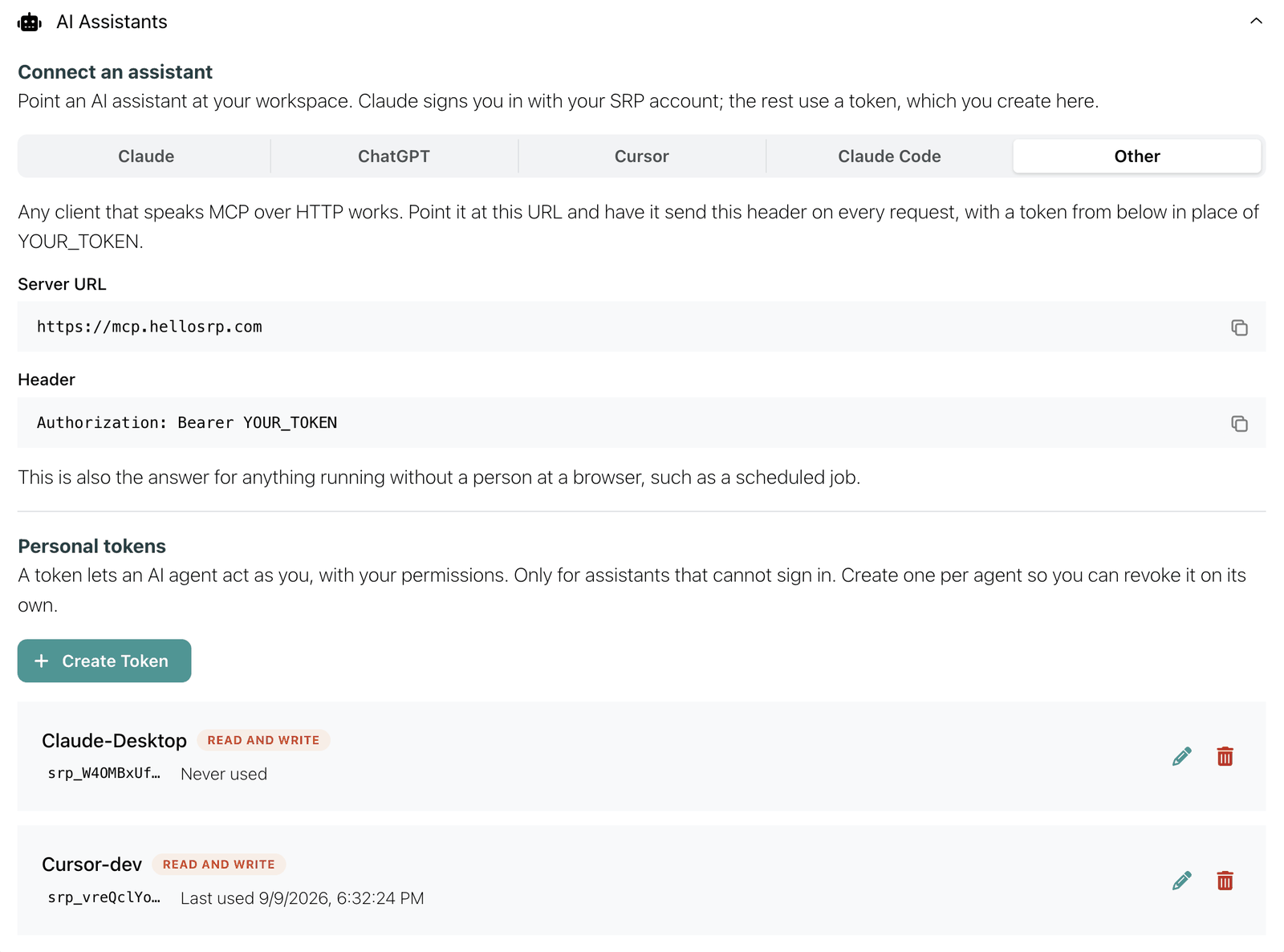
Pick your client, copy what it asks for, and manage your tokens in the same place.
Every plan gets it, the Free one included. Not an enterprise add-on, not a tier you have to climb to. One person running SRP for free gets the same tools, reads and writes, as a hundred person company.
Most of the agentic era so far is assistants that can write things. The useful version is an assistant that knows what is actually going on. Yours is one line away.